A new Jython book will be published by Apress this fall entitled 'The Definitive Guide to Jython with Django'. Authors include Jim Baker, Frank Wierzbicki, Leo Soto, Victor Ng, and myself.
This book will be of interest to those beginning Jython and also to advanced users. We will also maintain an open source version of the book online.
I'm looking forward to working with these talented individuals and assisting in the documentation of Jython.
Sunday, March 29, 2009


Tuesday, February 24, 2009
EMD Upload Error: Oracle Enterprise Management Agent
I came into work on Monday and saw that all of the databases which are running on our development database server were no longer reporting to our Oracle Grid Control. After looking at the Grid Control server, I realized that the management agent was not functioning correctly. Time to investigate...
I went to the command line and issued the following:
emctl status agent
Everything looked fine, but then I realized that the "Collection Status" indicated that it had been disabled by the collection manager. In my case, this had occurred because over the weekend I had been moving some files around and filled up one of the disks on the server completely. Realizing I had done so, I immediately removed some of those files to free up disk space. Unfortunately, this disk which filled up was the same one on which the Oracle Management Agent is installed. Being that the disk filled up and that the collection manager was not able to add the required XML files to disk, it immediately disabled itself.
The remedy: Of course, ensure that the disk has available space. Once you've done so, simply restart the management agent. It will begin working immediately.
I went to the command line and issued the following:
emctl status agent
Everything looked fine, but then I realized that the "Collection Status" indicated that it had been disabled by the collection manager. In my case, this had occurred because over the weekend I had been moving some files around and filled up one of the disks on the server completely. Realizing I had done so, I immediately removed some of those files to free up disk space. Unfortunately, this disk which filled up was the same one on which the Oracle Management Agent is installed. Being that the disk filled up and that the collection manager was not able to add the required XML files to disk, it immediately disabled itself.
The remedy: Of course, ensure that the disk has available space. Once you've done so, simply restart the management agent. It will begin working immediately.
Thursday, February 05, 2009
Developing Django-Jython Using Netbeans
If you are interested in using Django on Jython, then you will need to incorporate the Django-Jython project into your Jython installation after Django has been installed. The Django-Jython project facilitates the use of Jython's zxJDBC database infrastructure in order for Django to access database backends. At this time, the only fully supported database is Postgresql, but there are also experimental backends for using SQL Server, sqllite, and Oracle under development. In order to use Django on Jython with another database or to assist in the development of these backends, you will need to download the Django-Jython project source code and write your own backend or update one which already exists.
Working with the Django-Jython project using a text editor is one way to go, but if you are used to the automation and simplicity of using an IDE, text editing can be a painful experience. This blog will walk you through the steps of setting up an environment within Netbeans 6.5 for developing the Django-Jython project.
The process of development with Django-Jython is as follows:
1. Download source for project
2. Add/Modify source code to facilitate your needs
3. Build the source and install it into your Jython home
Number 1 above is easy enough, just visit the Django-Jython project page. However, numbers 2 and 3 are manually performed processes. You can help to automate these processes by using the power of Netbeans. Simply follow the procedure below to set up the environment:
1) Create a Python project with existing sources and name it something like "DjangoJython"
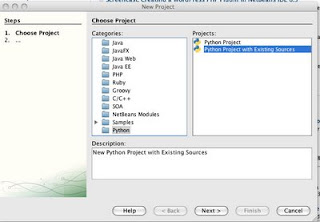
2) Add the root-level directory of the "django-jython" source folder to the "Source Root Folders" window area when creating the project, then click finish.
At this point your project will be created and you can work with the source. However, we need a way to tell the IDE to build and install the project. You can either use the command-line to do so by traversing to the project folder and issuing:
jython setup.py build, followed by, jython setup.py install
Or, you can perform have Netbeans IDE build the project for you when you invoke the "Run" process on the project by performing step 3.
3) Right-click on the project, and choose "Properties". Select the "Run" category and then enter "setup.py" as the main module and enter "install" into the application arguments text field. Now, each time you elect to "run" the project, it will cause netbeans to build and install it.

The only caveat to using this method of building and installing Django-Jython is that you will need to manually delete the "build" directory in your DjangoJython Netbeans project as well as delete the "doj" directory from your Jython installation (Jython-Path/Lib/site-packages/doj) prior to issuing "run" each time. I have found that if you do not, sometimes all of the updated modules are not reinstalled. Deleting these directories prior to running your build/install forces a new build and install to take place each time.
Now, enjoy the great development experience of Netbeans while contributing to a great project...Django-Jython! Have fun!
Working with the Django-Jython project using a text editor is one way to go, but if you are used to the automation and simplicity of using an IDE, text editing can be a painful experience. This blog will walk you through the steps of setting up an environment within Netbeans 6.5 for developing the Django-Jython project.
The process of development with Django-Jython is as follows:
1. Download source for project
2. Add/Modify source code to facilitate your needs
3. Build the source and install it into your Jython home
Number 1 above is easy enough, just visit the Django-Jython project page. However, numbers 2 and 3 are manually performed processes. You can help to automate these processes by using the power of Netbeans. Simply follow the procedure below to set up the environment:
1) Create a Python project with existing sources and name it something like "DjangoJython"

2) Add the root-level directory of the "django-jython" source folder to the "Source Root Folders" window area when creating the project, then click finish.
At this point your project will be created and you can work with the source. However, we need a way to tell the IDE to build and install the project. You can either use the command-line to do so by traversing to the project folder and issuing:
jython setup.py build, followed by, jython setup.py install
Or, you can perform have Netbeans IDE build the project for you when you invoke the "Run" process on the project by performing step 3.
3) Right-click on the project, and choose "Properties". Select the "Run" category and then enter "setup.py" as the main module and enter "install" into the application arguments text field. Now, each time you elect to "run" the project, it will cause netbeans to build and install it.

The only caveat to using this method of building and installing Django-Jython is that you will need to manually delete the "build" directory in your DjangoJython Netbeans project as well as delete the "doj" directory from your Jython installation (Jython-Path/Lib/site-packages/doj) prior to issuing "run" each time. I have found that if you do not, sometimes all of the updated modules are not reinstalled. Deleting these directories prior to running your build/install forces a new build and install to take place each time.
Now, enjoy the great development experience of Netbeans while contributing to a great project...Django-Jython! Have fun!
Wednesday, January 21, 2009
Django-Jython: Working With Experimental Database Backends - Part 1
This is the first of several blogs that I plan to publish regarding the use of experimental database backends with the Django-Jython project. In this series of blogs, I will cover the basics of how to begin using the experimental backends, as well as some details on how to create your own. At the time of this posting, only one "fully supported" backend exists for the Django-Jython project and that is for the PostgreSQL database. However, another experimental backend exists for SQLLite and there are more on the way.
In order to build and begin using the experimental backend for SQLLite (or others), you must first obtain a copy of the code, which is available on the project site, or via your command-line using the following line:
svn checkout http://django-jython.googlecode.com/svn/trunk/ django-jython-read-only
Once you've obtained the code, it is easy to build. Simply traverse into the root directory of the downloaded code which should be named "django-jython", and perform the build using the setup.py build script as such:
jython setup.py build
Now, this works nicely for a build to use the PostgreSQL backend, but it will not include the experimental backend implementations. In order to do so, you must open up the setup.py script and add the experimental backend that you wish to use within the "packages" listing as follows:
from distutils.core import setup
setup(
name = "django-jython",
version = "0.9",
packages = ['doj',
'doj.backends',
'doj.backends..zxjdbc',
'doj.backends..zxjdbc.postgresql',
'doj.backends..zxjdbc.sqllite', # Experimental backend
'doj.management',
'doj.management.commands'],
...
Once you've added this to the setup.py script, it will cause the experimental code to be built the next time the build process is invoked. Now you can begin using the new backend.
Next time I plan to delve into the process of creating your own experimental backend for the Django-Jython project!
In order to build and begin using the experimental backend for SQLLite (or others), you must first obtain a copy of the code, which is available on the project site, or via your command-line using the following line:
svn checkout http://django-jython.googlecode.com/svn/trunk/ django-jython-read-only
Once you've obtained the code, it is easy to build. Simply traverse into the root directory of the downloaded code which should be named "django-jython", and perform the build using the setup.py build script as such:
jython setup.py build
Now, this works nicely for a build to use the PostgreSQL backend, but it will not include the experimental backend implementations. In order to do so, you must open up the setup.py script and add the experimental backend that you wish to use within the "packages" listing as follows:
from distutils.core import setup
setup(
name = "django-jython",
version = "0.9",
packages = ['doj',
'doj.backends',
'doj.backends..zxjdbc',
'doj.backends..zxjdbc.postgresql',
'doj.backends..zxjdbc.sqllite', # Experimental backend
'doj.management',
'doj.management.commands'],
...
Once you've added this to the setup.py script, it will cause the experimental code to be built the next time the build process is invoked. Now you can begin using the new backend.
Next time I plan to delve into the process of creating your own experimental backend for the Django-Jython project!
Sunday, January 11, 2009
Jython 101 - Altering Tuple Values
Often times we use lists and tuples to hold data that will be used at some later point in an application. When we iterate through the data within them without changing it then they work without any issues. However, if we wish to change one or two of the values that are contained in a tuple then we may run into an issue because they are immutable in the Jython world. Lists are a bit different as they can be altered. If you've run into this issue with tuples and need an easy solution, then hopefully the technique which I am about to describe will help you.
The Problem
Let's say we have a tuple of parameters that we wish to pass to another Jython module at some later point. However, once the receiving function obtains the tuple of parameters, it is found that a value needs to be added to it in order to make it complete. How do we add or insert a value into a tuple if they are immutable?
The Solution
Quite easily actually, the answer is that we define a list that will take the values of the tuple and pass it on.
For instance, lets define tuple:
x = ("one", "two", "four")
print x
['one', 'two', four']
If we try to alter the tuple and insert the value "three" before the four, we receive an error:
x[2] = "three"
TypeError: can't assign to immutable object
Therefore, a great workaround is to define an empty list and populate it with the contents of the tuple. At the same time, you can add, change, or remove any elements that you wish. In the end, use the newly define list as your "new" parameter list and pass it on.
# define empty list
y = []
# iterate through tuple and populate new list
for elem in x:
# check element to see if it's contents need to be changed, or moved
# in this case, we are looking for an element with the value "four"
# so that we can insert "three" in front of it
if elem == "four":
# Insert the new element, and then the current element
y.append("three")
y.append(elem)
else:
# Insert the current element
y.append(elem)
print y # Use the new list and continue.
['one', 'two', 'three', 'four']
I hope that you find this tip for using Jython tuples useful.
The Problem
Let's say we have a tuple of parameters that we wish to pass to another Jython module at some later point. However, once the receiving function obtains the tuple of parameters, it is found that a value needs to be added to it in order to make it complete. How do we add or insert a value into a tuple if they are immutable?
The Solution
Quite easily actually, the answer is that we define a list that will take the values of the tuple and pass it on.
For instance, lets define tuple:
x = ("one", "two", "four")
print x
['one', 'two', four']
If we try to alter the tuple and insert the value "three" before the four, we receive an error:
x[2] = "three"
TypeError: can't assign to immutable object
Therefore, a great workaround is to define an empty list and populate it with the contents of the tuple. At the same time, you can add, change, or remove any elements that you wish. In the end, use the newly define list as your "new" parameter list and pass it on.
# define empty list
y = []
# iterate through tuple and populate new list
for elem in x:
# check element to see if it's contents need to be changed, or moved
# in this case, we are looking for an element with the value "four"
# so that we can insert "three" in front of it
if elem == "four":
# Insert the new element, and then the current element
y.append("three")
y.append(elem)
else:
# Insert the current element
y.append(elem)
print y # Use the new list and continue.
['one', 'two', 'three', 'four']
I hope that you find this tip for using Jython tuples useful.
Joined the Netbeans Community Docs Team
I have joined the Netbeans Community Docs team recently. This is a great program that has been put together to allow the Netbeans community to help document and provide guides for using the IDE. I hope that I am able to add some benefit to the team by providing tutorials, articles, and documentation from time to time. I am also going to be compiling and editing the monthly newsletter for the group.
Stay tuned for more Netbeans-related blog entries focused on using the IDE with all of the technologies I love...including (but not limited to) Java, JavaEE, Jython, Groovy, JavaFX, Swing, SQL...and more!
Stay tuned for more Netbeans-related blog entries focused on using the IDE with all of the technologies I love...including (but not limited to) Java, JavaEE, Jython, Groovy, JavaFX, Swing, SQL...and more!
Sunday, January 04, 2009
Web Beans 1.0.0 Alpha Released
JBoss has released Web Beans 1.0.0 Alpha recently. Quoted from the Web Beans site:
"Web Beans defines a set of services for the Java EE environment that makes applications much easier to develop. Web Beans layers an enhanced lifecycle and interaction model over existing Java component types including JavaBeans and Enterprise Java Beans. As a complement to the traditional Java EE programming model, the Web Beans services provide:
* an improved lifecycle for stateful components, bound to well-defined contexts,
* a typesafe approach to dependency injection,
* interaction via an event notification facility, and
* a better approach to binding interceptors to components, along with a new kind of interceptor, called a decorator, that is more appropriate for use in solving business problems.
Web Beans is especially useful in the context of web applications, but is applicable to many different kinds of applications and may even be used in the Java SE context, in conjunction with an embeddable EJB Lite container, as defined in the EJB 3.1 specification. "
I'll be checking this out soon...
"Web Beans defines a set of services for the Java EE environment that makes applications much easier to develop. Web Beans layers an enhanced lifecycle and interaction model over existing Java component types including JavaBeans and Enterprise Java Beans. As a complement to the traditional Java EE programming model, the Web Beans services provide:
* an improved lifecycle for stateful components, bound to well-defined contexts,
* a typesafe approach to dependency injection,
* interaction via an event notification facility, and
* a better approach to binding interceptors to components, along with a new kind of interceptor, called a decorator, that is more appropriate for use in solving business problems.
Web Beans is especially useful in the context of web applications, but is applicable to many different kinds of applications and may even be used in the Java SE context, in conjunction with an embeddable EJB Lite container, as defined in the EJB 3.1 specification. "
I'll be checking this out soon...
Tuesday, December 23, 2008
Jython Podcast Domain Name
Thanks to Groovymag.com, the Jython Podcast site is now available at jythonpodcast.com. If you haven't yet had a chance to read Groovymag, I suggest that you take a look if at all interested in Groovy or Grails. The magazine is an excellent resource for beginners and advanced Groovy users alike.
Thanks to Michael Kimsal and the Groovymag for the domain name.
Thanks to Michael Kimsal and the Groovymag for the domain name.
Friday, December 19, 2008
Jython Podcast Site Ready
I finished the preliminary Jython Podcast website last week and I thought that it would be a good idea to release it to the world for your thoughts and opinions. I wanted to create and deploy the website as a Django site running on Jython. However, as it turns out I am unable to deploy a Django on Jython site to a server running on JDK 1.5 (at least I haven't figured out how to do it as yet). Therefore, I have had to postpone the deployment of the Django site until I can upgrade to JDK 1.6.
It is my plan to begin the podcast with an episode near the end of December. Hopefully once I get the first episode released, iTunes will not have any problems updating to include it.
Check out the Jython Podcast site here. I also would like to thank HostJava.net for providing the domain name and sponsoring the podcast.
It is my plan to begin the podcast with an episode near the end of December. Hopefully once I get the first episode released, iTunes will not have any problems updating to include it.
Check out the Jython Podcast site here. I also would like to thank HostJava.net for providing the domain name and sponsoring the podcast.
Tuesday, December 02, 2008
Jython CLASSPATH
I ran into a small issue this past weekend while doing some Django development with Jython 2.5 b0. The Django scripts appeared to be running correctly until I attempted to synchronize with the database using:
jython manage.py syncdb
Each time I tried to run this against my Postgresql backend I was receiving an error stating that "org.postgresql.Driver" could not be found. In reality, that driver was already in my Jython CLASSPATH because it is installed by default when Django is set up.
The issue may be that I have too many Jython installations on my Mac now, but nonetheless, it is easy to work around. I still have not found the complete solution as yet, but as long as the "--verify" argument is passed along with the "syncdb" call then everything works out well. This is because the verify argument forces the CLASSPATH to be parsed at runtime. While the --verify argument makes it take a second or two longer to run, it should resolve issues where the CLASSPATH is not being parsed as it should.
Workaround solution:
jython --verify manage.py syncdb
jython manage.py syncdb
Each time I tried to run this against my Postgresql backend I was receiving an error stating that "org.postgresql.Driver" could not be found. In reality, that driver was already in my Jython CLASSPATH because it is installed by default when Django is set up.
The issue may be that I have too many Jython installations on my Mac now, but nonetheless, it is easy to work around. I still have not found the complete solution as yet, but as long as the "--verify" argument is passed along with the "syncdb" call then everything works out well. This is because the verify argument forces the CLASSPATH to be parsed at runtime. While the --verify argument makes it take a second or two longer to run, it should resolve issues where the CLASSPATH is not being parsed as it should.
Workaround solution:
jython --verify manage.py syncdb
Wednesday, November 19, 2008
NetCAT 6.5 Complete!
I'd like to thank all of the developers at Netbeans for hosting a great NetCAT session for the 6.5 release. It seemed that everyone on the development team played an important role in this great release and the NetCAT team members also provided meaningful feedback and assistance.
I'd recommend that anyone who is interested in having their voice heard for future releases of Netbeans should get involved in future NetCAT programs. All of us members certainly had "our say" in many features of the final product. This is a program that really goes to show how much the community can make a difference.
Thanks again to Netbeans developers and fellow NetCAT 6.5 participants.
I'd recommend that anyone who is interested in having their voice heard for future releases of Netbeans should get involved in future NetCAT programs. All of us members certainly had "our say" in many features of the final product. This is a program that really goes to show how much the community can make a difference.
Thanks again to Netbeans developers and fellow NetCAT 6.5 participants.
Netbeans 6.5 GA Available
If you haven't done so already, I suggest that you go and pick up Netbeans 6.5 at this time. It is arguably the best IDE release ever. Along with the Java feature updates, this new version of the IDE includes Groovy support, compile on save, and Python support is available in EA format.
If you want to migrate your libraries from an older version of 6.5 (release candidate), simply copy the project libraries files. See this wiki article for more details.
If you want to migrate your libraries from an older version of 6.5 (release candidate), simply copy the project libraries files. See this wiki article for more details.
Tuesday, November 04, 2008
Check out GroovyMag
Interested in Groovy or Grails? If you are then you'll want to check out GroovyMag.com as the first issue of GroovyMag is now available for download. Unfortunately, it looks like you have to purchase the magazine. However, the cost looks pretty reasonable and it looks as though there is a lot of good content...probably worth the $4.99, so check it out at http://www.groovymag.com/main/ to see a summary of the content.
Thursday, October 30, 2008
Netbeans 6.5 RC2
Download Netbeans 6.5 RC2 now and try it out.
If you have been using 6.5 RC1, then you will need to redo all of your settings for RC2. However, the easiest way to get around this is to copy the contents of your Netbeans user directory from RC1 into RC2. If you do this then all of your settings will be retained.
Test RC2 and give feedback to the development team (nbdev@netbeans.org) if there are issues.
If you have been using 6.5 RC1, then you will need to redo all of your settings for RC2. However, the easiest way to get around this is to copy the contents of your Netbeans user directory from RC1 into RC2. If you do this then all of your settings will be retained.
Test RC2 and give feedback to the development team (nbdev@netbeans.org) if there are issues.
Monday, October 20, 2008
Jython Monthly Newsletter
Anyone who wishes to post an article for the October distribution of Jython Monthly should place link on the following page. http://wiki.python.org/jython/JythonMonthly/Articles/October2008
Distribution of the newsletter will occur this week. Thanks in advance for all article submissions.
Distribution of the newsletter will occur this week. Thanks in advance for all article submissions.
Wednesday, September 24, 2008
Java for Mac OS X 10.5 Update 2
Java for Mac OS X 10.5 Update 2 has been released. Mac users (with compatible machines) should go to software updates and download soon. I just installed the update and used it to run some tests with Netbeans 6.5 and the performance is much better than running on an Apple JDK 1.5 release.
Things are looking good so far...
Learn About Java 16 New Features: https://examples.javacodegeeks.com/java-16-new-features-tutorial/
Tuesday, September 09, 2008
Groovy Datasources - Changing Hibernate Dialect - Oracle 11g
I found a funny while working with some Grails applications today. I have been developing one of my Grails applications for about 2 or 3 weeks now. I updated DataSource.groovy on Day 1 to make the application work with my development Oracle repository and all was well.
Yesterday, I migrated my development Oracle environment to 11g and my Grails application stopped functioning. I was receiving messages stating that the correct Hibernate dialect was not able to be determined. I was forced to explicitly list which dialect to use within my DataSources.groovy file and I thought I'd share.
If you migrate to Oracle 11g (from any previous release...in my case it was 10.2.0.3), and you need to specify the Hibernate dialect then you will need to add the following line to your DataSources.groovy within the DataSource block:
dialect = org.hibernate.dialect.OracleDialect
Yesterday, I migrated my development Oracle environment to 11g and my Grails application stopped functioning. I was receiving messages stating that the correct Hibernate dialect was not able to be determined. I was forced to explicitly list which dialect to use within my DataSources.groovy file and I thought I'd share.
If you migrate to Oracle 11g (from any previous release...in my case it was 10.2.0.3), and you need to specify the Hibernate dialect then you will need to add the following line to your DataSources.groovy within the DataSource block:
dialect = org.hibernate.dialect.OracleDialect
Monday, September 08, 2008
Detecting Google Chrome In Javascript
Thanks to javascript.internet.com, here is a quick post on how to detect the new Google Chrome browser from within your Javascript code.
var is_chrome = navigator.userAgent.toLowerCase().indexOf('chrome') > -1;
By the way, if you are looking for some great javascript tips, take a look at javascript.internet.com as it is an excellent resource.
var is_chrome = navigator.userAgent.toLowerCase().indexOf('chrome') > -1;
By the way, if you are looking for some great javascript tips, take a look at javascript.internet.com as it is an excellent resource.
Monday, September 01, 2008
Having Fun with JavaFX
I finally had a chance to play around a bit with Fx over this long holiday weekend. At this point, the JavaFx script language is fairly straight forward, but I still find myself looking at examples in order to get the syntax correct when building a GUI.
http://silveiraneto.net/2008/08/11/javafx-draggable-node/
http://silveiraneto.net/2008/07/31/javafx-creating-a-sphere-with-shadow/
I will be posting some updates to this blog at a later date. As for now, I've successfully created a news ticker using JavaFX and I plan to release the source once I've worked out all of the rough edges.
More to follow...
http://silveiraneto.net/2008/08/11/javafx-draggable-node/
http://silveiraneto.net/2008/07/31/javafx-creating-a-sphere-with-shadow/
I will be posting some updates to this blog at a later date. As for now, I've successfully created a news ticker using JavaFX and I plan to release the source once I've worked out all of the rough edges.
More to follow...
Monday, August 25, 2008
Jython News!
Check out the latest Jython Monthly for some great news on the up and coming Jython 2.5 release. It is now in alpha stages, but it is looking great so far!
You can also read-up on using Django with Jython...good work Leo Soto! Also take this opportunity to ask all of your Jythonic questions of Jim Baker...a lead Jython developer. See newsletter for more details!
You can also read-up on using Django with Jython...good work Leo Soto! Also take this opportunity to ask all of your Jythonic questions of Jim Baker...a lead Jython developer. See newsletter for more details!
Subscribe to:
Posts (Atom)